

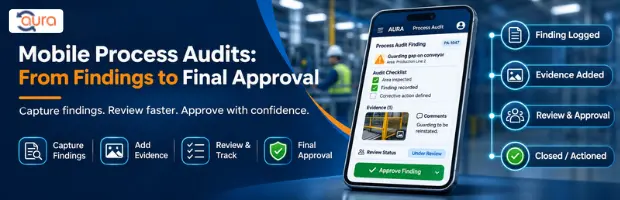
Customer Success Story
Introduction
For automotive and industrial manufacturers, process audits often happen where the work is actually being performed: on the shop floor, at a supplier location, across production areas, or within different plant functions.
That creates a practical documentation problem.
An auditor may complete a checklist on-site, collect supporting evidence, identify findings, and then need to transfer the information into another system before the audit can move through review and approval.
When these steps depend on paper forms, spreadsheets, separate evidence files, emails, and manual follow-ups, the audit record can become fragmented.
This case study looks at an anonymized automotive and industrial manufacturing use case in which the focus was on improving the process audit workflow from on-site audit execution through findings, review, and final approval.
AURA provided the digital workflow needed to connect audit checklists, evidence, findings, ownership, review, and reporting within the quality-management environment.
Aura already positions its QMS for manufacturing and engineering organizations around centralized audit management, findings, evidence, CAPA, document control, dashboards, and mobile-friendly access.
About the Customer
Industry
Automotive / Industrial Manufacturing
Quality Environment
The customer represents a manufacturing environment where process assurance and supplier quality are important parts of the quality function.
The audit environment can involve:
- Production processes
- Process compliance
- Supplier quality
- Quality checkpoints
- Audit checklists
- Findings and observations
- Evidence collection
- Corrective actions
- Review and approval
- Audit reporting
The quality team needs to assess whether defined processes are being followed and whether identified issues are properly documented and followed through to closure.
Typical Users
The workflow is relevant to:
- Quality Managers
- Process Auditors
- Internal Auditors
- Plant Quality Teams
- Supplier Quality Engineers
- Operations Managers
- Department Heads
- Quality Approvers
- QMS Administrators
The Business Challenge
Process Audits Were Not Just About Completing a Checklist
The core problem was broader than the audit checklist itself.
An auditor might complete a process audit at the location where the activity was taking place. During that audit, the auditor could identify a finding and collect supporting evidence.
The challenge came after the observation was made.
The information needed to move through several stages:
Audit → Evidence → Finding → Review → Approval → Final Report
When those stages are handled through separate tools or manual communication, information can become difficult to consolidate.
On-Site Audit Information Was Difficult to Centralize
Process auditors need access to the right checklist while conducting an audit.
They may also need to record:
- Checklist responses
- Observations
- Findings
- Supporting evidence
- Responsible persons
- Follow-up actions
- Review comments
A paper checklist or disconnected spreadsheet does not naturally connect all of these elements.
The result can be additional administrative work after the auditor leaves the audit location.
Evidence and Findings Need to Stay Connected
An audit finding is more useful when the supporting evidence can be located alongside it.
Without a connected digital record, teams may have to search through:
- Email attachments
- Shared folders
- Spreadsheet entries
- Separate photographs
- Paper records
- Individual auditor files
That makes subsequent review more difficult.
Aura’s audit capabilities are designed to maintain audit information, findings, evidence, and actions within a centralized quality workflow.
Review and Approval Can Become a Separate Manual Exercise
After the audit itself, findings may need to be reviewed before the audit is finalized.
A manual process can create questions such as:
- Has the finding been reviewed?
- Who is responsible for the next action?
- Has the required evidence been attached?
- Has the finding been approved?
- Is the audit ready for final reporting?
- Which version of the report is current?
The issue is not simply speed.
The quality team needs to know where each audit stands and what needs to happen next.
Previous Process vs AURA Workflow
| Before AURA | With AURA |
|---|---|
| Paper or spreadsheet-based checklist | Digital audit checklist |
| Evidence maintained separately | Evidence linked to the audit workflow |
| Findings recorded separately from supporting information | Findings maintained within the audit record |
| Manual follow-up with responsible teams | Assigned actions and workflow tracking |
| Review handled through email or separate communication | Structured review and approval workflow |
| Limited visibility into audit status | Centralized audit status and reporting |
| Difficult to retrieve historical audit information | Searchable digital audit records |
| Final report preparation requires manual consolidation | Structured audit reporting |
| Plant-level information may remain fragmented | Centralized visibility across locations |
Aura’s current location and plant audit capabilities include centralized planning, checklist execution, evidence tracking, CAPA closure, reassignment controls, and dashboard reporting.
Why the Organization Needed a Different Approach
The customer did not simply need another checklist application.
The requirement was for a workflow that could connect the work performed during the audit with what happened afterward.
The quality team needed a process that could move from:
Audit Preparation
to
On-Site Audit Execution
to
Evidence and Findings
to
Review
to
Approval
to
Final Audit Reporting
This distinction shaped the implementation approach.
The AURA Solution
A Mobile-Friendly Digital Process Audit Workflow
AURA was used to structure the process audit around a connected digital workflow.
The focus was on keeping the audit information together from the point of execution through final approval.
The workflow can be represented as:
Plan Audit
↓
Assign Auditor
↓
Open Digital Checklist
↓
Conduct Process Audit
↓
Record Responses and Findings
↓
Capture Supporting Evidence
↓
Submit for Review
↓
Review Findings
↓
Approve
↓
Generate / Finalize Audit Report
This approach reduces the need to reconstruct the audit after the on-site activity has finished.
AURA’s current manufacturing positioning includes mobile-friendly access for plant-level teams and centralized audit workflows covering findings, evidence, actions, and closure.
Key Features Used
1. Digital Process Audit Checklists
The audit checklist becomes part of the digital workflow rather than remaining as a standalone paper or spreadsheet document.
Auditors can work through defined audit questions and record the relevant responses within the audit process.
This supports greater consistency in how process audits are conducted.
2. Evidence Capture
Audit findings often require supporting evidence.
AURA’s audit workflow supports maintaining evidence alongside audit information, allowing reviewers to understand the finding together with its supporting record.
This is particularly relevant when an audit involves multiple process areas or locations.
3. Finding and Observation Management
When an auditor identifies a process issue, the finding can be recorded as part of the audit workflow.
This provides a clearer connection between:
Audit Question → Observation → Finding → Action
Rather than requiring the quality team to reconstruct that relationship later.
4. Ownership and Follow-Up
A finding is only useful if the organization knows who needs to act on it.
AURA’s task and CAPA capabilities support assigning responsibility, monitoring actions, and tracking closure.
This provides a more structured path from finding identification to corrective-action follow-up.
5. Review and Approval
The audit process can include review before the final report is completed.
This provides a defined point at which quality or management stakeholders can review the audit information and approve the output.
Aura’s existing customer-audit case study similarly describes role-based workflows in which QA and other stakeholders submit, review, and approve audit information.
6. Audit Reporting
Once the audit has progressed through the required review stages, the information can be used for audit reporting.
This avoids creating a separate report from disconnected records.
AURA’s broader audit platform provides configurable audit reporting and visibility into audit history and findings.
How the New Workflow Worked
Stage 1: Audit Planning
The quality team prepares the audit and assigns responsibility.
The audit scope, checklist, and relevant process information are made available to the auditor.
Stage 2: On-Site Audit
The auditor conducts the process audit using the digital checklist.
Instead of waiting until the audit is complete to transfer information, the audit information is captured as the work is performed.
Stage 3: Finding Identification
When a process gap or non-conformance is identified, the auditor records the observation or finding within the audit workflow.
Stage 4: Evidence
Supporting evidence can be associated with the audit record so that the reviewer has the necessary context.
Stage 5: Review
The completed audit moves through the defined review process.
The reviewer can examine the checklist responses, findings, and supporting information.
Stage 6: Approval
Once the required review is complete, the audit can move through the approval stage.
Stage 7: Final Reporting
The approved information can then support the final audit report and subsequent corrective-action tracking.
Results and Business Impact
The available case-study brief does not provide verified customer-specific percentages, cost savings, or time-reduction figures.
Therefore, no numerical result has been attributed to the anonymized customer.
The documented workflow supports several practical improvements.
Better Audit Traceability
The audit information remains connected across:
- Checklist responses
- Findings
- Evidence
- Actions
- Review
- Approval
- Reporting
This gives quality teams a clearer record of what happened during the audit and what happened afterward.
Less Manual Consolidation
When audit information is captured within a structured system, teams have less need to consolidate information manually from separate checklists, emails, and evidence files.
Clearer Ownership
Findings and actions can be connected to responsible users and follow-up activities.
This makes it easier to determine who needs to respond and what remains open.
Faster Access to Audit Information
A centralized digital record makes it easier for authorized users to review audit status, findings, and supporting information without depending on individual auditor files.
Aura’s current product pages describe centralized audit visibility, task tracking, evidence management, and dashboards as part of its QMS workflow.
Stronger Review Control
The workflow creates a defined path from finding identification to review and approval instead of treating the final report as a separate document-production exercise.
Verified Metrics
No customer-specific metrics were supplied in the case-study template.
Accordingly, this case study does not claim:
- Percentage reduction in audit time
- Percentage reduction in report preparation
- Cost savings
- Percentage improvement in audit closure
- Reduction in findings
- Improvement in supplier quality
- ROI
For a future customer-approved version, useful measurements would include:
- Average time required to complete a process audit
- Time from finding identification to approval
- Audit-report preparation time
- Percentage of findings with complete evidence
- Average finding-closure time
- Number of audits completed digitally
- Percentage of audits completed on schedule
- Reviewer turnaround time
- User adoption of mobile audit workflows
Key Benefits Achieved
Based on the documented workflow, the primary benefits are:
- Digital process audit execution
- Better evidence organization
- Clearer finding traceability
- Structured review and approval
- Centralized audit records
- Better visibility into open findings and actions
- Reduced dependence on paper and disconnected files
- Easier access to audit history
- Better coordination between auditors, quality teams, and approvers
- A connected path from audit findings to final reporting
Why This Approach Matters in Automotive and Industrial Manufacturing
Manufacturing quality teams often operate between two different environments.
The audit happens where the process is being performed.
The review and management decision may happen somewhere else.
A mobile-friendly audit workflow helps connect those two environments.
An auditor can work at the plant or process location while the broader quality workflow remains centralized.
This is particularly relevant for organizations managing multiple plants, departments, suppliers, or business units. Aura’s location and plant audit functionality is specifically positioned around centralized oversight, plant-wise ownership, evidence tracking, CAPA follow-up, and management reporting.
For automotive manufacturers, the wider quality environment also includes supplier quality, compliance requirements, and process consistency. Aura’s automotive positioning covers audit scheduling, compliance, supplier tracking, risk-based audits, and dashboards.
Lessons Learned
1. A Mobile Checklist Alone Is Not Enough
Digitizing the checklist solves only one part of the audit process.
The greater value comes from connecting the checklist with:
- Evidence
- Findings
- Actions
- Review
- Approval
- Reporting
2. Findings Need a Clear Path to Closure
Recording a finding is only the beginning.
The workflow needs to make ownership, follow-up, evidence, and approval visible.
3. Evidence Should Stay With the Audit Record
When supporting evidence is separated from the finding, reviewers spend additional time locating and verifying it.
Connecting evidence to the audit record provides better context.
4. Approval Should Be Part of the Workflow
The final approval should not depend on an informal email chain or a separate document version.
A defined approval stage makes the status of an audit easier to understand.
5. Mobile Access Is Most Useful When It Connects to the Full QMS
The purpose of mobile audit access is not simply to make a checklist available on a phone or tablet.
It should allow information captured during the audit to continue through the quality workflow.

