

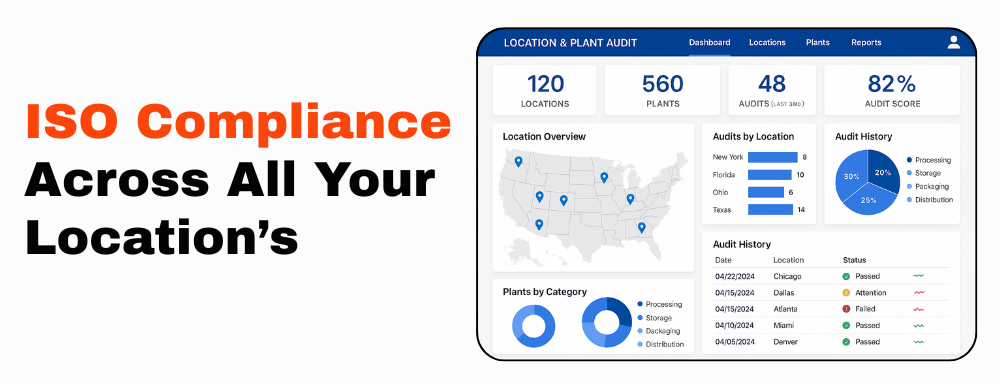
Location and Plant Audit Management Software
Ensure quality across all sites with Aura QMS, an integrated multi-location quality management software for complete audit visibility, compliance control, task ownership, CAPA follow-up, and management reporting.
Auditing operations across multiple plants, warehouses, or facilities is not only about checking boxes. It is about making sure every location follows consistent quality processes, meets internal compliance expectations, and closes audit findings with evidence.
Aura QMS helps organizations manage location and plant audits through centralized audit planning, plant-wise ownership, checklist execution, evidence tracking, CAPA closure, reassignment control, mobile-friendly alerts, and dashboard roll-up reporting.
Key Benefits of Aura’s Location and Plant Audit System
Aura QMS enables companies to manage multi-site audits with better visibility and control. From improving audit readiness to standardizing follow-up across plants, Aura helps quality teams reduce disconnected records and manage audits from one connected platform.
Unified Oversight for All Sites
Manage audits across plants, warehouses, facilities, departments, and business units from one centralized QMS platform.
Improved ISO Audit Readiness
Use structured checklists, controlled workflows, evidence records, and CAPA tracking to support ISO audit preparation.
Plant-Wise Audit Visibility
Review audit status, open findings, pending evidence, overdue CAPA, and audit scores across each plant or location.
Streamlined Scheduling
Plan annual audits, schedule audit cycles, assign owners, and monitor audit progress from preparation to closure.
CAPA Tracking Across Sites
Assign corrective actions, track responsibility, monitor target dates, and verify closure evidence across locations.
Management Roll-Up Reporting
Give leadership a consolidated view of audit progress, plant performance, NC trends, OFI count, and closure status.
Key Features of Aura’s Location and Plant Audit Management Software
- Centralized audit information hub: Manage audit plans, checklists, findings, documents, CAPA actions, reports, and closure evidence in one system.
- Real-time notifications: Alert stakeholders about upcoming audits, reassigned tasks, pending evidence, overdue actions, and CAPA deadlines.
- Mobile-friendly audit follow-up: Help plant users review alerts, due dates, and assigned actions from mobile-friendly views where enabled.
- Role-based access control: Give local teams access to relevant plant records while maintaining corporate-level oversight.
- CAPA management across sites: Track corrective actions, root cause, responsibility, target date, evidence, and closure status by location.
- Complete audit lifecycle tracking: Monitor every audit from planning and checklist execution through NC/OFI creation, CAPA closure, and final reporting.
- Integration-ready review: Where required, integration requirements with ERP, supplier portals, document systems, or other business tools should be reviewed during implementation.
Feature accuracy note: Use “offline access,” “AI-driven insights,” “auto-classification,” or “ERP sync” only if Aura’s product team confirms those capabilities for the customer’s implementation scope.
Core Features of Aura QMS for Multi-Site Audits
- Multi-location audit templates: Set up location-based or global audit procedures to match each plant’s operating process.
- Location mapping and hierarchy: Map corporate office, regions, plants, departments, lines, and responsible audit owners.
- Role-based access control: Provide local teams with the tools they need while maintaining corporate quality oversight.
- Mobile-friendly reminders: Support faster follow-up through alerts for upcoming audits, overdue tasks, reassigned actions, and CAPA deadlines.
- CAPA management across sites: Manage corrective action ownership, evidence, due dates, and closure verification by plant.
- Dashboard roll-up: Review planned audits, completed audits, open findings, OFIs, overdue CAPA, and plant-wise audit performance.
Complete Multi-Plant Audit Workflow in Aura
This workflow shows how Aura supports a complete location and plant audit program from corporate planning to plant-level closure.
1
Create Plant Hierarchy
Set up corporate office, regions, plants, departments, production lines, audit owners, auditors, auditees, and CAPA owners.
2
Prepare Annual Audit Plan
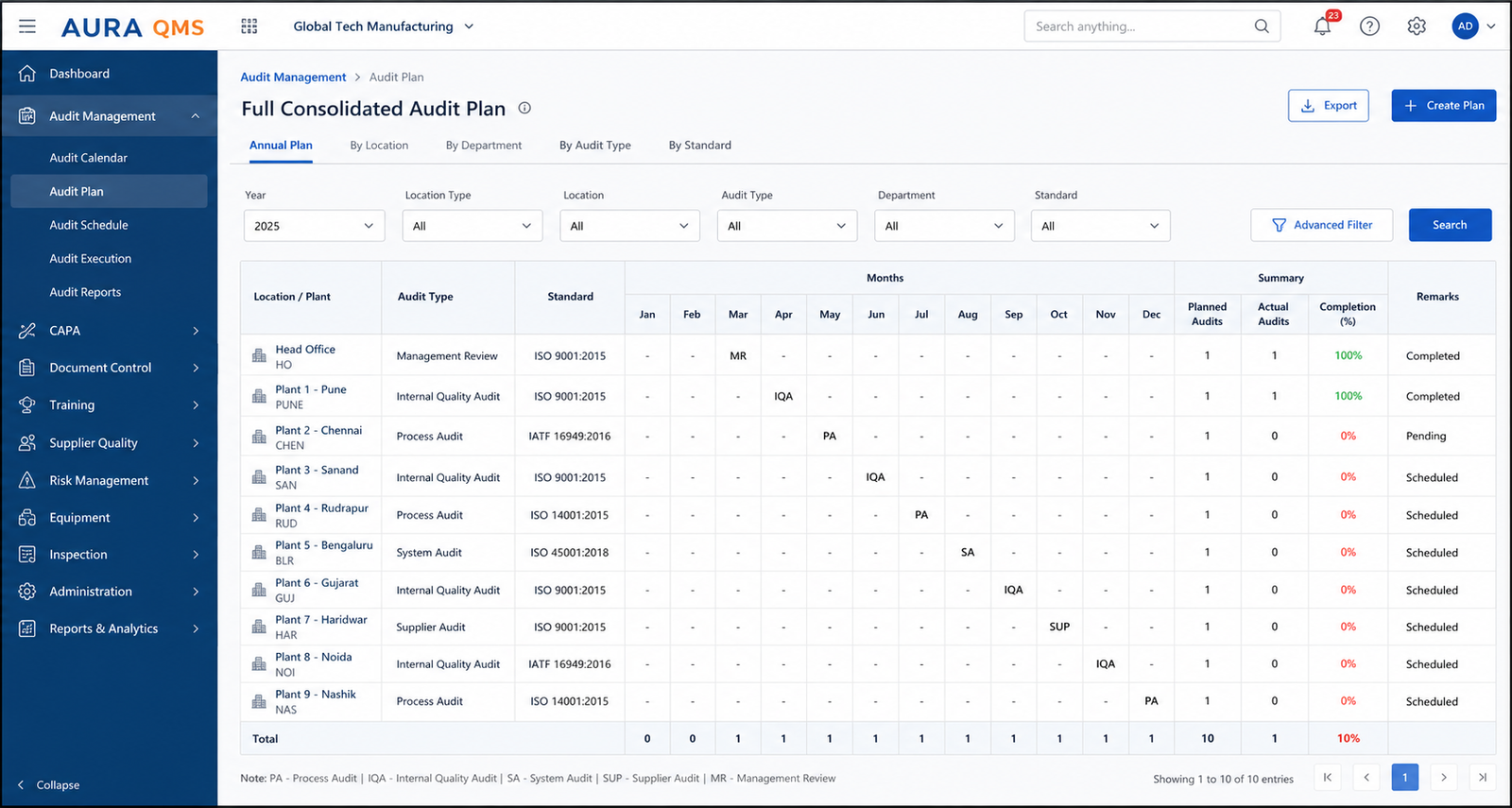
Create the annual audit calendar by plant, audit type, department, month, frequency, and compliance requirement.
3
Assign Audit Owners
Assign auditors, auditees, plant coordinators, department owners, evidence owners, and CAPA owners for each planned audit.
4
Schedule Audit Cycles
Define audit dates, cycle dates, start time, end time, checklist scope, audit type, location, and responsible users.
5
Send Alerts and Reminders
Notify users about upcoming audits, pending evidence, overdue findings, CAPA target dates, and reassigned actions.
6
Conduct Plant Audit
Capture checklist responses, observations, evidence status, scores, non-conformities, OFIs, and audit comments.
7
Raise NC / OFI / CAPA
Convert findings into non-conformity reports, OFIs, corrective actions, responsibilities, target dates, and verification workflows.
8
Reassign When Needed
Reassign audit or CAPA tasks when the original owner is unavailable while preserving responsibility history and reason.
9
Verify Closure Evidence
Review uploaded evidence, root cause, corrective action, preventive action, effectiveness review, and final closure comments.
10
Review Roll-Up Dashboard
Compare plants by audit progress, open NCs, overdue CAPA, OFI count, audit score, and closure status.
Role and Reassignment Rules for Multi-Plant Audits
Multi-plant audits need clear ownership. Aura should define who can create, edit, reassign, approve, verify, and close audit activities across plants.
| Role | Primary Responsibility | Reassignment Rule | Control Rule |
|---|---|---|---|
| Corporate Quality Head | Creates audit strategy, annual audit calendar, audit frequency, and management dashboard. | Can reassign plant-level audit ownership when a plant owner is unavailable or escalated. | Should not delete completed audit history or closure evidence. |
| Regional Quality Lead | Monitors audits across assigned region and escalates overdue actions. | Can reassign within assigned region if admin rights allow. | Reassignment should capture reason, new owner, date, and comment. |
| Plant Manager | Reviews plant audit readiness, assigned findings, department owner status, and closure progress. | Can request reassignment when a department owner or CAPA owner is unavailable. | Should see relevant plant records only unless wider access is approved. |
| Plant Quality Owner | Coordinates audit preparation, checklist evidence, plant-level responses, and CAPA follow-up. | Can reassign evidence or CAPA tasks to department owners based on responsibility. | Audit trail should preserve original owner, new owner, date, and reason. |
| Auditor | Conducts audit, records checklist responses, observations, evidence, NC, OFI, and audit score. | Audit assignment can be reassigned by authorized quality roles. | Auditor should not approve their own corrective action closure where segregation is required. |
| Auditee / Department Owner | Responds to observations, provides evidence, performs correction, and supports root cause analysis. | Can request reassignment to another owner with justification. | Cannot remove auditor observations or final verification comments. |
| CAPA Owner | Completes root cause, corrective action, evidence upload, and target-date closure. | Can be reassigned before closure with reason and approval. | Overdue CAPA should remain visible in dashboards and escalation reports. |
| System Admin | Manages user access, plant mapping, role permissions, audit templates, and escalation settings. | Can configure reassignment rules based on organization policy. | Should maintain controlled access and avoid unnecessary global permissions. |
Recommended reassignment rule: Every reassignment should capture original owner, new owner, reassignment reason, reassignment date, due date impact, and notification status.
Full Consolidated Audit Plan
Mobile Proof for Plant Audit Follow-Up
Multi-plant audit teams often need to act quickly on audit reminders, pending evidence, reassigned tasks, and CAPA follow-ups. Aura supports plant-level users with mobile-friendly audit follow-up visibility so responsible teams can stay updated without waiting for manual reminders.
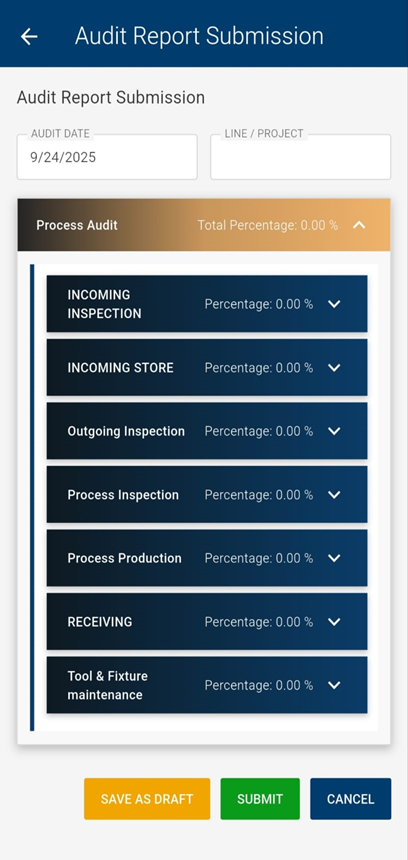
Plant Audit Follow-Up View
This mobile proof shows how plant users can review audit-related updates, assigned actions, follow-up items, and pending responsibilities from a mobile-friendly screen.
What This Mobile Proof Shows
- Plant users can review audit follow-up items quickly.
- Responsible owners can track assigned audit actions.
- Audit teams can follow up on pending evidence and due tasks.
- Plant managers can monitor audit activity without depending only on email updates.
- Reassigned or pending audit actions can remain visible for better accountability.
Multi-Plant Dashboard Roll-Up Example
A roll-up dashboard helps corporate quality teams compare audit progress, open findings, overdue CAPA, and plant-wise performance without opening every plant record separately.
| Plant / Location | Planned Audits | Completed Audits | Open NC | Open OFI | Overdue CAPA | Audit Score | Management Action |
|---|---|---|---|---|---|---|---|
| Plant 1 – Assembly | 12 | 10 | 3 | 4 | 1 | 84% | Review overdue CAPA and verify closure evidence. |
| Plant 2 – Machining | 10 | 10 | 1 | 2 | 0 | 91% | Maintain schedule and monitor recurring findings. |
| Plant 3 – Welding | 14 | 11 | 5 | 3 | 2 | 78% | Escalate high-risk findings and reassign overdue actions. |
| Plant 4 – Final Inspection | 8 | 7 | 2 | 1 | 0 | 88% | Close pending audit and confirm evidence upload. |
| Corporate Roll-Up | 44 | 38 | 11 | 10 | 3 | 85% | Focus on overdue CAPA and repeated plant-level NC trends. |
Dashboard example note: These values are sample figures for explanation. Replace them with real dashboard screenshots or anonymized product data only after internal approval.
Example: Managing Audits Across Three Plants
A manufacturing company operates three plants in different locations. The corporate quality team creates an annual audit calendar in Aura and assigns audits to each plant based on risk, certification needs, and internal compliance schedules.
Each plant manager receives alerts for upcoming audits, pending evidence, and assigned corrective actions. If one plant quality owner is unavailable, the task can be reassigned to another responsible user without losing audit history or accountability.
After the audits are completed, Aura gives leadership a roll-up dashboard showing audit progress, open findings, overdue CAPA, and plant-wise performance. This helps the company compare locations, identify recurring issues, and close audits with evidence.
Why Aura for Location and Plant Audits?
Aura QMS is more than simple audit tracking. It helps multi-site organizations standardize audit execution, assign clear ownership, track findings, manage CAPA closure, and review plant-wise audit performance from one platform.
- Global oversight with local ownership: Corporate teams can monitor all plants while local users manage plant-specific responsibilities.
- Flexible and scalable audit structure: Add new plants, departments, audit types, and users as your audit program grows.
- Dashboard-driven visibility: Review audit status, open findings, overdue CAPA, and plant-wise trends through consolidated reports.
- Controlled reassignment: Reassign audit and CAPA tasks while keeping accountability, owner history, and reason for change.
- Audit-ready evidence: Maintain observations, documents, closure proof, root cause, corrective action, and verification details.
Important Claim and Feature Notes
Use measurable percentage claims only when Aura has calculation proof or customer-approved benchmark data. Replace unsupported claims such as “70% visibility improvement” with safer wording such as “improves management visibility across plant audits.”
Use “mobile alerts” or “mobile-friendly access” only for capabilities that are currently available in Aura. Use “offline access” only if the product team confirms offline audit capture is supported.
Use ERP integration, inventory sync, or AI-based claims only when Aura has implementation proof or product team confirmation for that feature.
Achieve Audit Control Across All Your Locations
With Aura Location and Plant Audit Management Software, organizations can standardize audit execution across multiple sites while giving each plant team clear ownership, real-time alerts, CAPA tracking, and audit-ready records.
See how multi-location audit planning, task tracking, mobile-friendly alerts, CAPA follow-up, reassignment control, and roll-up dashboards work in one platform.

